Customise AI4Padel: templates, tone and approvals
No two clubs write alike. One is on first names and closes with an emoji; another addresses members of twenty years formally. AI4Padel does not ship with a factory voice or a mandatory level of automation: it adjusts to your club, and this guide walks through every piece you can touch. The screenshots show the real product, which today speaks Spanish.
The number is yours
Messages leave from the WhatsApp number of your club, not from a platform: from the one your members already have saved. For the player it is a normal conversation with their usual club, no new app, no new account. Even your 68-year-old member replies “yes” and takes the seat.
It also means replies land at the club, not on your personal phone. And the number and the conversations are yours: if you ever leave AI4Padel, you keep them.
Everything comes from your templates
Every message the club sends is born from a club template. That is the house rule and it has no exceptions: a text that does not come from one of your templates is never sent on its own. Not one made-up word ever reaches a member.
Each kind of message (“Complete a match”, “Match confirmation”, “Invite back”, “Seat already covered”) has tone variants, typically a warm one and a formal one, tuned with you during setup until they sound like your club. Templates carry variables, like the player’s name or the match time, and every save creates a new version: if you change the greeting in March, you will always know which text was live in February.
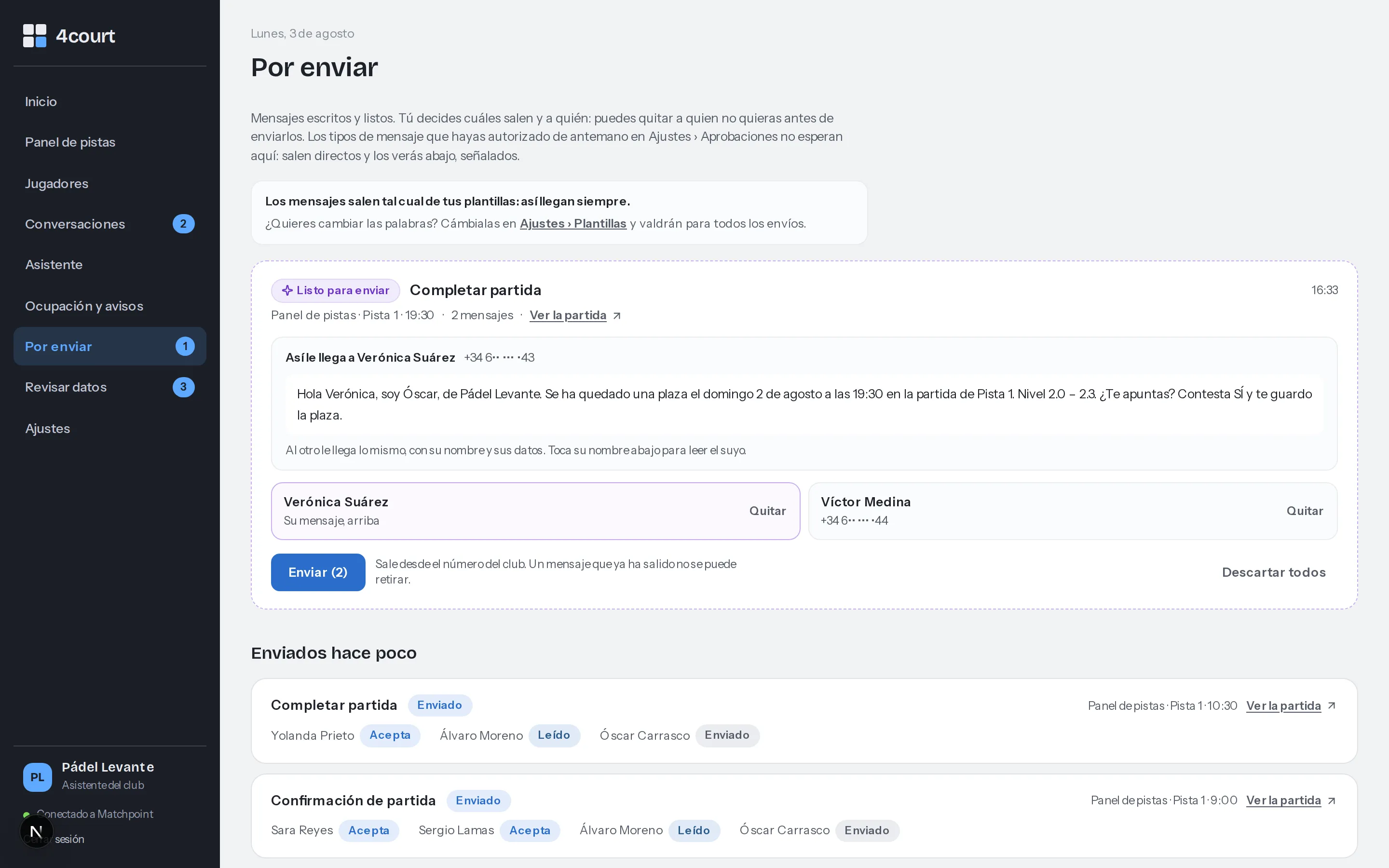
Por enviar (to send): the exact message each player will get, in full view before anything leaves.
The “Por enviar” screen shows it as it is: the literal message each person will receive, “Hola Verónica, soy Óscar, de Pádel Levante…” (Hi Verónica, this is Óscar from Pádel Levante). You can remove any recipient before pressing send, recent sends sit below with their statuses (accepted, read, sent) and the header block sums it up: messages go out as your templates wrote them.
One practical detail: WhatsApp requires approved templates to write to anyone who has not replied within the last 24 hours. Since everything here is born from templates, that is sorted during setup.
Autonomy per kind of message
There is no all-or-nothing switch: in Settings you choose, kind of message by kind of message, between “review before sending” (the default) and “send automatically”. Three ways of working:
- Manual. Everything sits written, waiting for you in “Por enviar”, and nothing leaves until you click. Every club starts here: trust comes from watching what it proposes and how it writes.
- Mixed. You pre-authorise the routine and keep reviewing the delicate. The first things clubs automate are match confirmations and the “seat already covered” notice, texts that never change and that nobody wants to approve fifteen times a day; invitations to complete a match come later, once you have reviewed dozens and they all looked fine.
- Autonomous. You authorise each class of message you care to and watch the outcome, not the process. “Invite back” campaigns are what most clubs prefer to keep approving by hand, and that makes sense.
Authorising in advance erases no trace: the send is recorded with the name of whoever authorised it and marked as sent under prior authorisation. Only an administrator can change these options. And the key sentence is literal in the product: “You decide what gets sent.”
Five guardrails that always stop a send
Even when a kind of message is authorised to leave on its own, five guardrails stop a send every single time, and no configuration can step over them:
- The text does not come from a club template. However good it sounds, it stays waiting for you.
- The recipient list was picked by the assistant and the club still reviews those lists: the send waits until you look at it.
- There are more recipients than you allow in a single send. You set the ceiling.
- It falls outside the hours you allow writing in. Nobody gets a promotion at three in the morning with your name under it.
- Somebody opted out while the message was waiting. The opt-out applies right then.
Autonomy decides when your click is not needed. If it clashes with a guardrail, the message does not leave.
Who handles each conversation
A club with four hundred members has dozens of threads open at once, and they do not all weigh the same. The conversations screen labels each one so you know where to look:
- “La lleva el asistente” (the assistant is handling it): the routine. A “count me in”, a confirmation, a reminder. It moves along under your rules and does not need you.
- “La llevas tú” (you are handling it): you stepped in to write, so the conversation is yours; the assistant stays out of it.
- “Necesita que entres tú” (needs you to step in): the assistant read something it should not answer and steps aside. A payment question, a complaint, anything delicate: it flags the thread and waits.
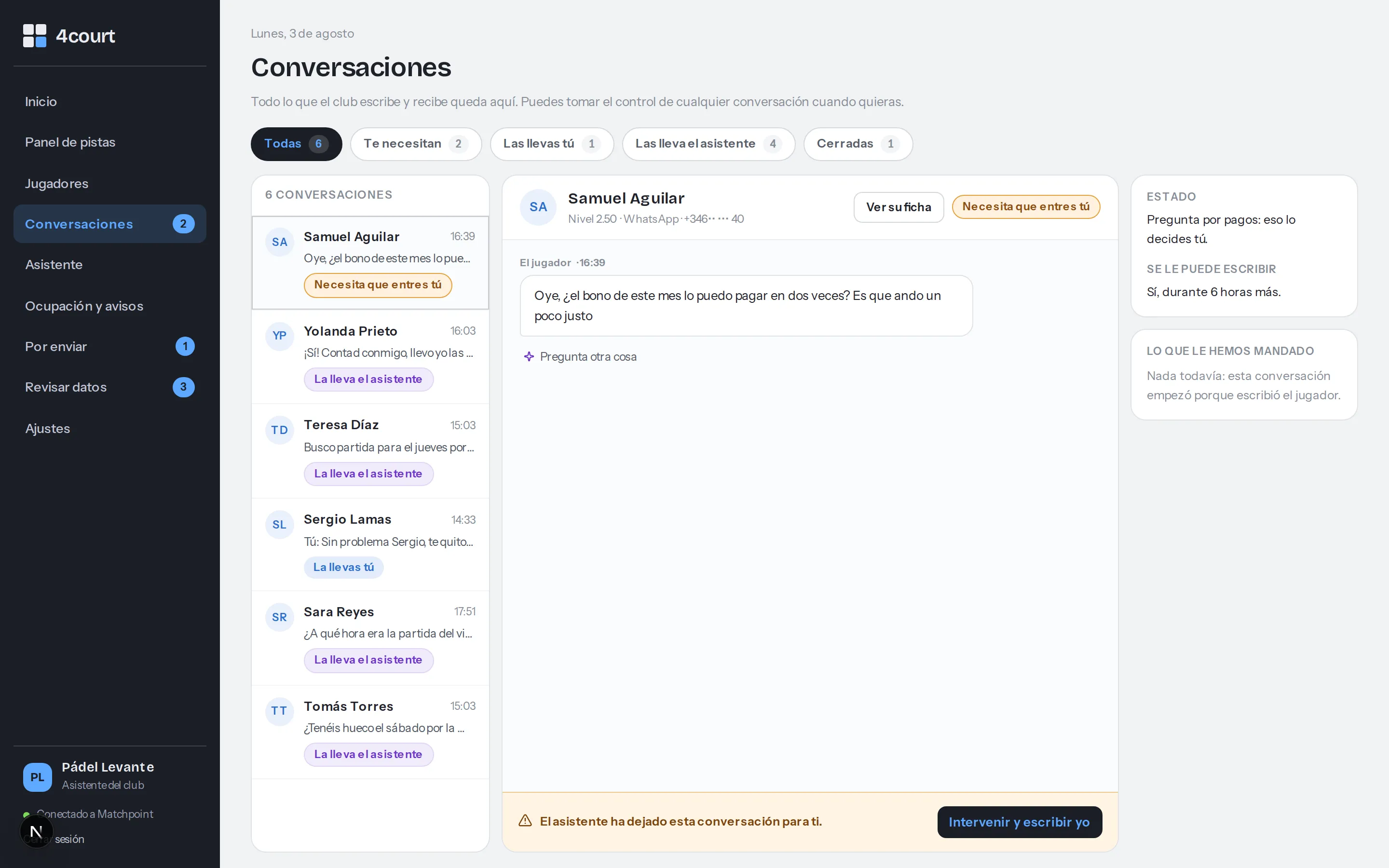
Conversations: each thread with its label and, on the right, a payment question the assistant leaves to the club.
On any thread, whoever is handling it, there is the “Intervenir y escribir yo” button (step in and write myself): one click and the conversation is yours, no permission asked.
AI4Padel’s AI reads and understands incoming messages, a “there are two of us” or an “I can’t make that time”, without you going thread by thread, and replies or leaves things prepared depending on what you automated. When picking players it applies your club’s criteria, every reason written out, as covered in how AI4Padel decides.
The internal assistant
Besides the conversations with players there is the assistant, an internal chat only you see. You ask it plain questions, which matches still need players today, who tends to play mornings, how occupancy is going, and you hand it work: “write to the people who have not been around lately”.
When it prepares something, it does not send it: it leaves it in “Por enviar” with a link. The note next to the chat is its operating rule: the assistant never writes to a player without your approval.
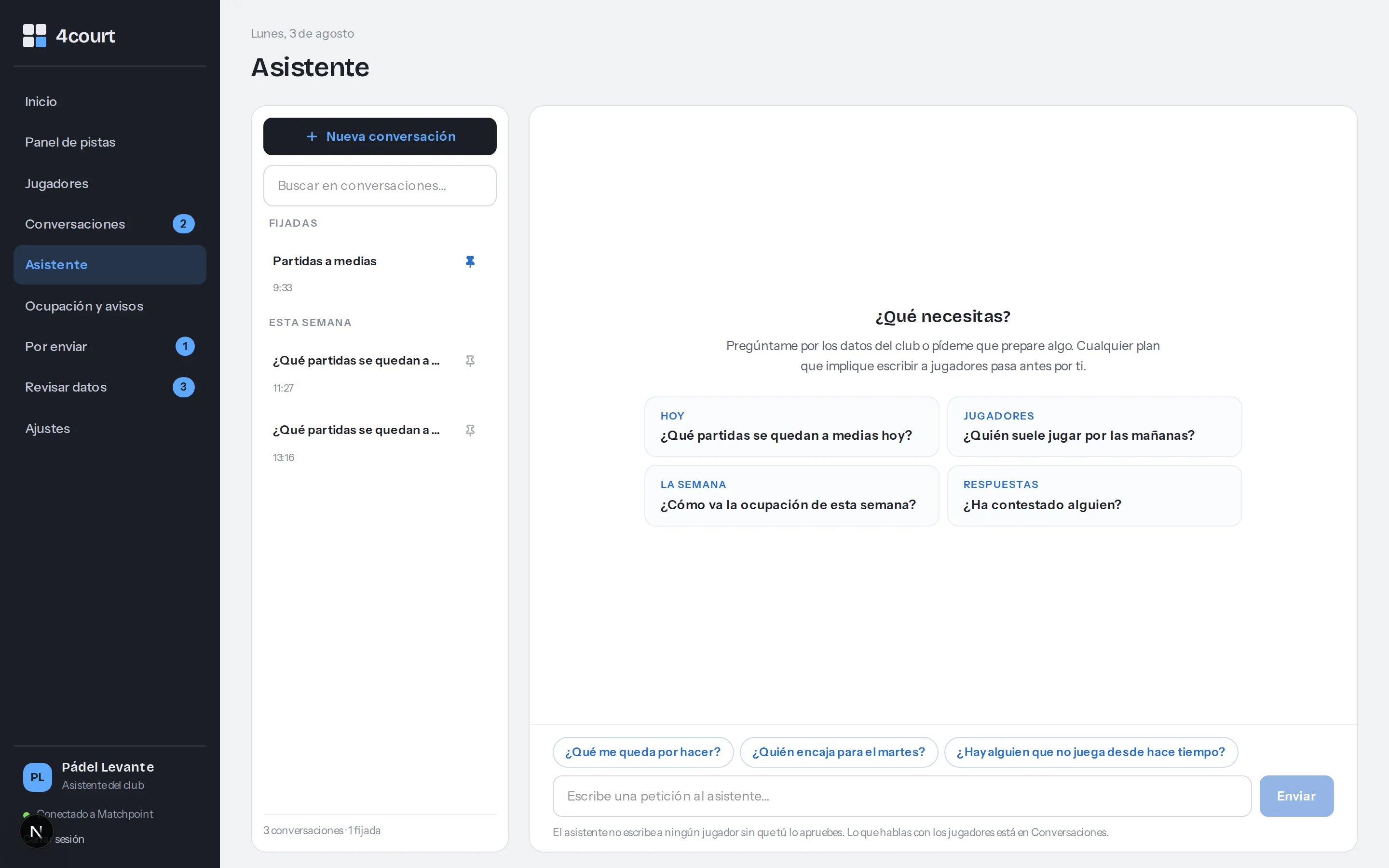
The assistant answers questions and prepares sends, but everything it drafts sits waiting for you in Por enviar.
Opt-outs are respected and promotions need permission
Every player carries two marks that come from your CRM, and AI4Padel enforces them at the core, not with a warning on screen:
- The opt-out. If a member asks not to be written to, they vanish from every list and every proposal. It is not a notice somebody might miss: the system makes writing to them impossible, even to complete a match.
- Permission for promotions. Without it, a player still gets operational messages (a missing fourth for his 7:30pm court is service), but he stays out of “invite back” and any campaign: the screen itself says only players with promo permission appear there.
If a member tells you in person at the front desk, it counts the same as in writing: record it in your CRM and the next data pull applies it on its own. Glance at “Por enviar” in case something was prepared for that person; even if it slipped past you, the opt-out is guardrail number five.
Campaign messages have a counter
Operational messages, invitations to complete a match, confirmations and reminders, are always included, with no counter. Campaign messages, like “invite back”, go by plan (100, 400 or 1,000 a month depending on yours) and, if a month runs short, packs of 250 cost 19 euros.
None of this asks for an afternoon of configuration: the number, the tone variants, the approvals and the guardrails are set on day one, and changing them later is two clicks for an administrator. How your members and your data come in, with nothing to migrate, has its own guide. Rather see it live? Book a 15-minute demo and we will go through it with your case.